On 10 September 2026, NOHO swapped all 986 product photos on its live Shopify store in about three hours. NOHO (noho.com.pk) sells demi-fine jewellery from Pakistan, mostly to shoppers on phones. Before the swap, 725 of its 993 catalogue photos were under 800 pixels wide. They looked soft the moment you pinched to zoom on a ring. So we rebuilt them.
| Measure | Result | When |
|---|---|---|
| Product photos replaced on the live store | 986 of 986 planned, across 505 products | 10 September 2026, about three hours |
| Judge verdicts before upload | 1,155 across 4 passes, 176 photos flagged | 9 September 2026 |
| Flagged photos that shipped with added detail | 0 of 176 | Checked against the override file, 23 September 2026 |
| Packshots reworked after a live-store review | 104 of 108 re-uploaded | 15 September 2026 |
Soft photos were the smaller risk; invented detail was the bigger one
Your photos look fine on the grid and blurry at zoom. If you sell jewellery or anny other product online, you know the problem. The photo is the product. A shopper cannot hold the ring, so the zoom does that job. Soft photos make a good piece look cheap.
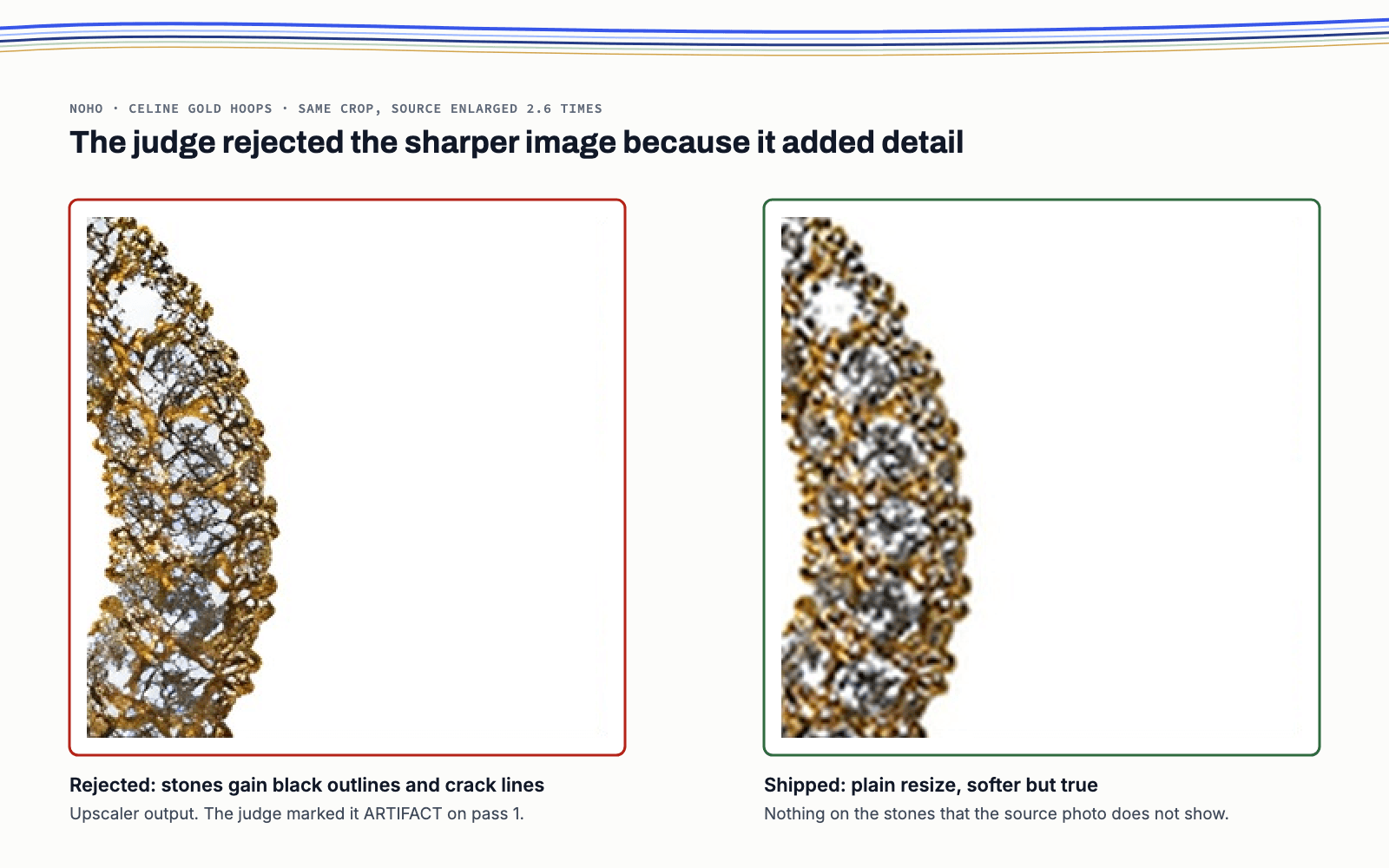
The quick fix is to run every photo through software that enlarges and sharpens as it goes. The catch is that this kind of software guesses, filling in pixels it never actually saw. On fine pavé, where tiny stones sit tightly packed together, those guesses can add outlines, cracks or texture that the real piece doesn't have.
That turns a blur problem into a trust problem. A photo that shows detail your product lacks is a promise the customer can hold you to. For a store where most orders are cash on delivery, a disappointed customer can refuse the parcel at the door.
A sharper photo that shows something the product does not have is worse than a soft photo. The whole project was built around refusing it.
The store could not afford a broken catalogue for even an hour
Three things stood in the way. The first was volume: 993 photos across 505 products is far too many to fix by hand in a day. The second was shape. The store's product cards crop to 2:3, two units wide for every three tall, and only 16 of the 993 originals matched it exactly. The third was where the work had to happen. Product photos aren't part of a theme, so they can't be staged on a preview copy. Every change had to go straight to the live store.
That third point set the rules. If anything failed, the old photo had to stay in place. And every product had to be reversible on its own, without touching the other 504.
What we built: a judge on every enlarged photo and a way back for every product
Autonomous designed and ran the pipeline end to end, with the founder, Rizwan, signing off on each stage. Product order and alt text, the words screen readers speak for a photo, stayed exactly as NOHO had them.
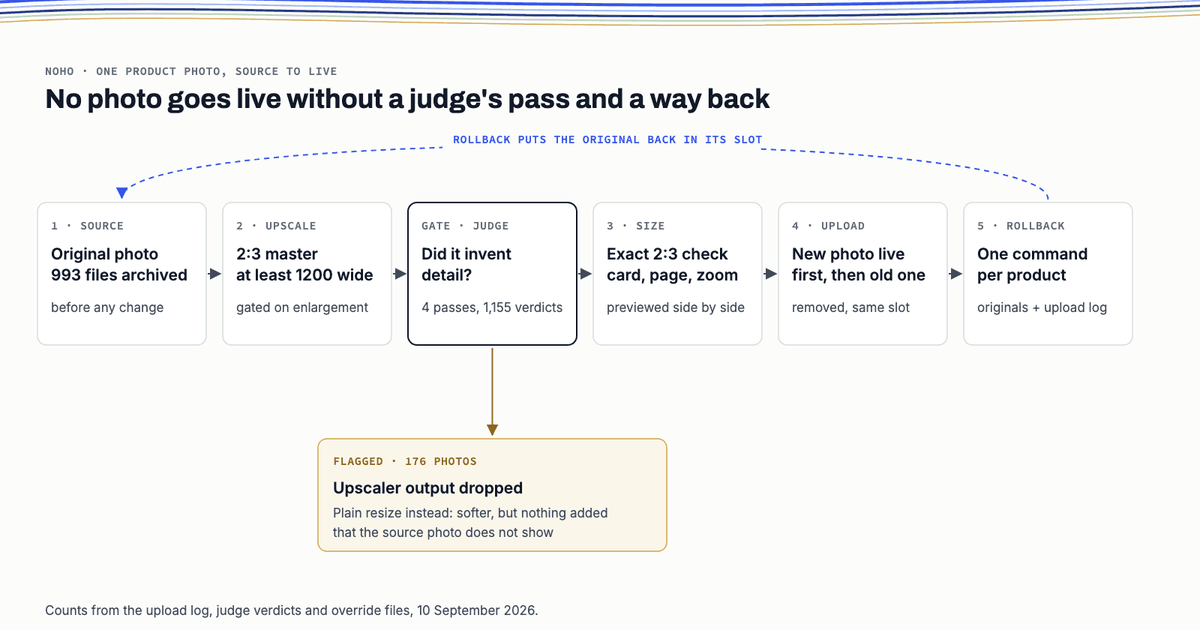
Every photo went through five steps:
- Archive. Before anything changed, all 993 originals were downloaded untouched and logged.
- Enlarge. Each photo became a master, the full size file the store uses to serve every smaller version. Every master came out at 2:3, either 1200 by 1800 pixels or 1600 by 2400.
- Judge. A second model compared zoomed crops of the original against the new master and marked each one as better, the same, worse or artifact. An artifact is any detail that shows up in the new photo but doesn't exist on the real piece.
- Size check. A review page showed 283 photos, every one flagged for review plus a random sample, at card, product page and zoom size, with before and after side by side.
- Upload with a way back. The new photo went live first, in the same slot. The old one was only deleted once the new one was ready.
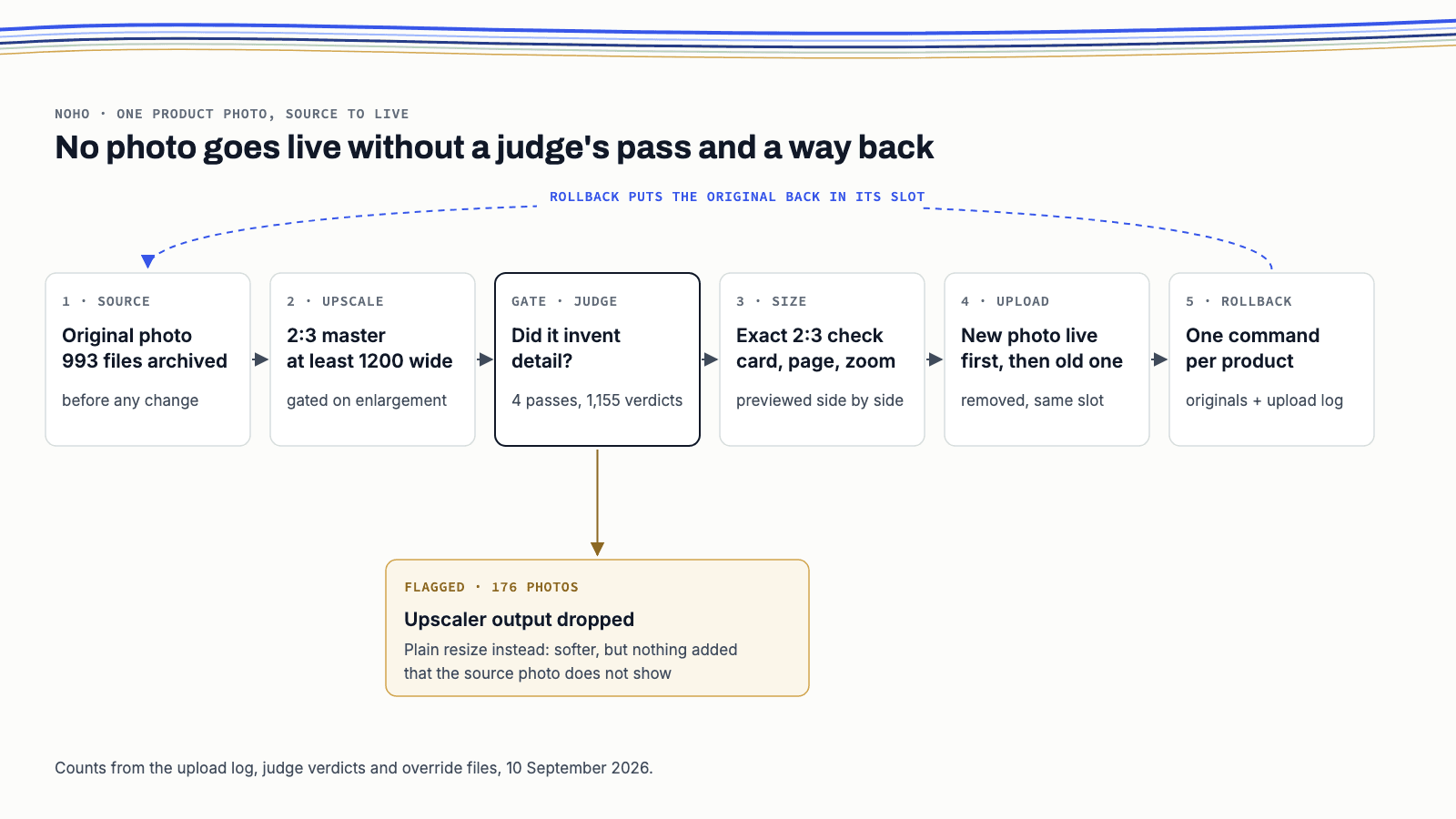
How was nothing invented? A flagged photo never used the sharpened output. The judge ran four passes and wrote 1,155 verdicts to a verdict file. It flagged 176 photos as artifact or worse. The override file sends all 176 to a plain resize: softer, but true to the source. Another 84 photos skipped sharpening outright, because they needed three times enlargement or more.
The upload never left a product without a photo. If the new photo was not ready within 30 seconds, it was deleted and the original stayed live.
Rolling back takes one command per product: upload.py --rollback <product>. It reads the upload log, which records every swap and when it happened, then finds the archived original and puts it back in the same position. We tested it as a dry run on 23 September 2026, and it found both originals for the test product. The 114 photos uploaded again on 15 and 16 September are the exception. Their log entries are out of date, so the way back for those is to upload them again straight from the archive.
The enlarging itself was done by Real-ESRGAN, an open source tool we ran on our own machine. But it didn't decide what shipped. The judge, the archive and the log did.
A review of the live store changed 104 photos five days later
On 15 September, a review of the live store flagged a different problem. Many packshots, the plain photos of a product on a white background, looked too big in the frame. That one was on us. A single fill rule had stretched every product to about 88 percent of the frame width.
We rendered 108 packshots again, mostly at a calmer 60 percent fill, and left the lifestyle photos alone. After three rounds of verdicts, 104 went live on 15 September. The other four stayed as they were, because the reviewer felt the 10 September versions were already fine. And for some of the 104, the reviewer actually preferred the untouched original files, so those are what went live.
| Measure | Before, 9 September 2026 | After, 10 to 23 September 2026 |
|---|---|---|
| Catalogue photos exactly 2:3 | 16 of 993 | 986 of 986 replacements, 10 September |
| Catalogue photos under 800 pixels wide | 725 of 993 | 0 of 986 replacements, 10 September; 9 originals restored at the 15 September review |
| Photos on the 505 products ready to serve | Not measured | 994 of 994, 23 September |
| Median phone card download, WebP (a compact image format) | Not measured | 26 KB at 540 px, 38 KB at 720 px, 23 September |
| Sales or conversion change | Not measured | Not measured: no GA4 install and no before-and-after test yet |
The August audit counted 216 MB across 995 store images at full size. That's a storage total, though, not what a page actually loads. And because sharper photos carry more real detail, they weigh a little more. At 800 pixels, the median photo is now 42 KB, up from 33 KB.
What we would do differently, and who this fits
We'd set the fill for each product shape from day one. Using one number for every packshot is what caused the 15 September rework. By that date it was affecting 399 packshots, and 48 of them got clipped when Meta cropped them square for catalogue ads.
What you get back is time. The whole catalogue gets rebuilt in one morning instead of photo by photo, and every original stays safe in an archive. This fits you if you sell on Shopify, your photos are small or mismatched, and you can't risk a photo that oversells. Jewellery, watches and fabric are where invented detail shows up fastest.
It's not for you if your photos are already sharp at 1,200 pixels, or if what you really need is new photography. It also can't rescue a photo where the product is under 300 pixels wide. NOHO has 32 of those, and they're on a reshoot list.
Questions and answers
Did any product photo go missing during the swap?
No. Each new photo went live before its old one was deleted. Thirteen uploads hit network errors on the first pass; the old photos stayed live and those 13 were retried.
How do you know the new photos show nothing that is not on the product?
A judge compared zoomed crops of every enlarged photo with its original. All 176 photos it flagged shipped as plain resizes, with no sharpening output at all.
Can NOHO undo it?
Yes, product by product. The 993 originals and the upload log are archived, and one command restores a product’s originals from the 10 September swap to the same positions. The 114 photos re-uploaded on 15 and 16 September go back by a re-upload from the archive.
Did the new photos increase sales?
Not measured. NOHO has no GA4 install yet and ran no before-and-after test, so any sales claim would be a guess. Measurement is on the build list.