Our Shopify lead funnel had a leak, we just couldn't see it. Connecting the store scanner, background jobs and tracking into one flow changed that, and showed us the exact moment scan interest fizzled out before it became a call.
Our own Shopify lead generation funnel had to work as a system
Autonomous is a Shopify systems agency for ecommerce founders and operators. This is our own project, not client work. We built the whole path, from a store URL typed into a form to a booked call with an engineer. At the same time we replaced our old WordPress site.
A store owner types in a URL, gets a scan, and can then book a call about the work. The hard part was joining up the whole trip, above all what happens after the form says thank you.
The new site had three jobs. Keep the old web addresses working. Give the marketing team a CMS they can edit, which is the tool that holds the site’s pages and text. And run scans without making the visitor wait. Tracking had to follow the lead past that first click. Those are old problems in new clothes: who owns the content, how slow work runs in the background, and how a record keeps its name as it moves between systems.
Preserving content ownership through a rebuild
We moved the site without losing the pages Google already knew, and without a code release wiping out the marketing team’s edits. The new site pairs Wagtail with Next.js. A redirect table sends old paths to new ones, and it covers nineteen old WordPress addresses. So keeping those links alive was part of the plan, not a shock after launch.
We can load page content from files held in version control. The loader spots pages that have been edited in the CMS and leaves them alone. That stops a code release from wiping the marketing team’s work. It also tells live pages from drafts. A repeatable release is only useful if it respects the people editing the site between releases.
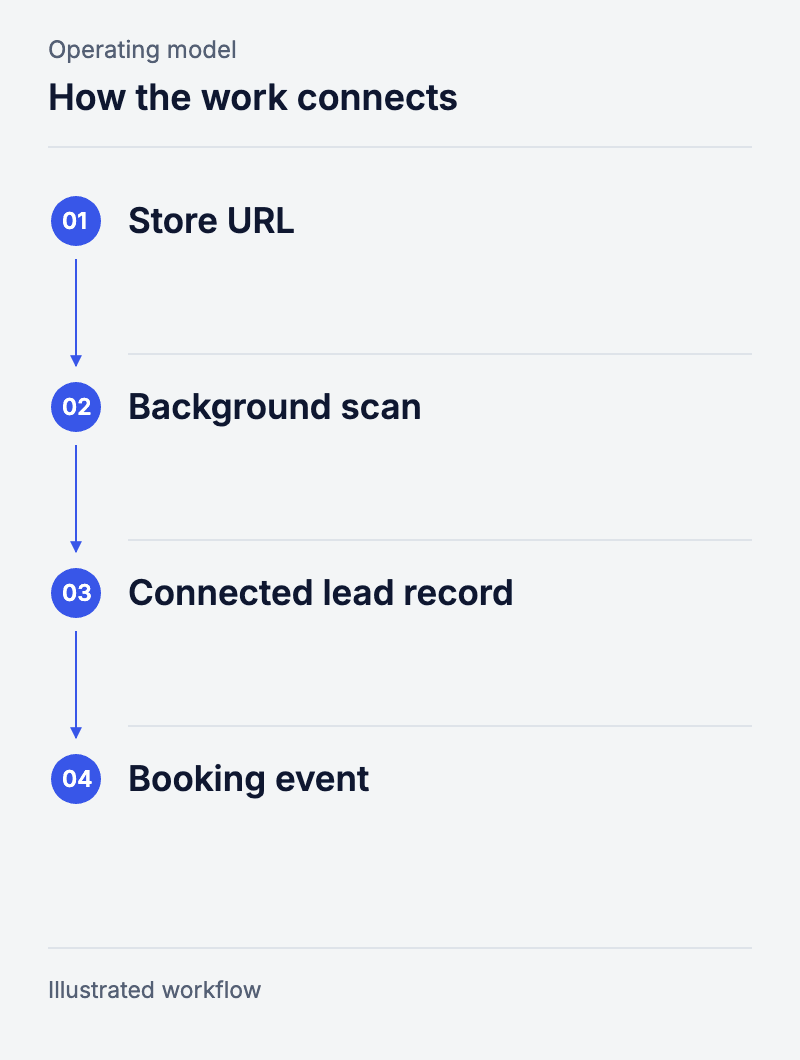
Workflow: Store URL → Background scan → Connected lead record → Booking event.
Running the store scan without blocking the page
Nobody waits on a spinner, and the system always knows which reports it still owes. The visitor sends a store URL and moves to a results page. Behind that page, a job runner called Celery does the scan. The scanner reads only what any shopper can see. It needs no store-admin login and it changes nothing in the live store.
The job runner marks each piece of work as queued, running or done. It can retry, and it can pick up where it left off. That matters because making a report and handing it over are two different events. If a worker restarts, or a call back to the site fails, the system has to know what is still owed. The wrong answer is to tell the team that everything is finished.
Conversion tracking that does not count one lead twice
One person, one form, one lead in the numbers. We send the same event twice, once from the browser and once from our server, and both carry the same event ID. So the tool at the other end can see two reports of one action, not two leads. What we capture at the form also feeds the later booking event.
The point is to be able to look at each step. Someone can send the form, get a scan, read the result, and never book. If the events are not linked, a team ends up tuning whatever is cheapest to count. Meanwhile the real drop-off stays hidden.
The data exposed a conversion problem
Our own report of 6 August 2026 counted 82 scans and one booked call in thirty days. So the funnel pulled in scans, but almost none of that interest became a call. The review we ran at the time put the blame on the report page and the booking step, which did a poor job of telling people what to do next.
We made changes after that. We have not yet published a later count, so treat the 82 and the 1 as one thirty-day window, not a trend. The build earns its keep in two ways. The joined-up flow runs on its own, and its numbers made a weak handover visible enough to chase.
People behind the work

Questions and answers
Does a public storefront scan change the store?
No. The scanner reads only what any visitor can see. Work that needs a login or changes anything in the store is a separate job.
Why send conversion events from both browser and server?
Two paths catch more than one. But they need a shared ID, or the same lead gets counted twice. We treat them as two reports of one event.
How do you find where a lead journey loses momentum?
Count each real step on its own, and keep the ID that links them. In this funnel, finishing a scan and booking a call were separate counts. That is what showed us the next step was badly explained.
Can this Shopify lead generation setup work for a store’s own enquiry funnel?
Yes. Three parts carry over. A background job that does not block the page. A lead record that keeps its ID across steps. And events de-duplicated, so one enquiry counts once. We built it for our own scan funnel. The same shape fits a quote request, a wholesale application or a repair booking.
How does this apply to a Shopify operation?
Any flow that crosses a form, a background task, a CRM and a person needs clear states and linked records. That holds for enquiries, quotes and day-to-day requests, not just our own funnel.