
Orders fail. What matters is whether you find out. Sene's routing layer turns every Shopify purchase into a factory order, tracks each one along the way, and gives the team a single place to fix the ones that break.
Autonomous is a Shopify systems agency. We build and repair the systems behind stores for the founders and staff who run them. Every figure on this page comes from our own project record for this build, checked in September 2026.
How Shopify order routing turns one checkout into several factory orders
A single Sene Studio order on Shopify can include garments made by four different partners. The customer sees one shop and one checkout. Behind the scenes, though, the business has to raise a separate order with each factory and follow every item through production and shipping.
That's the job of Shopify order routing. Order routing means working out where each item in an order needs to go, then sending it there in a format that destination can actually accept.
The hard part is that the four factories don't share a common standard. Their formats are different, and so are their units. Some want items one at a time, while others want the whole order in one go. So every checkout needs a translation layer that reads the order once, figures out the right factory for each item, and then passes it along in that factory's own language.
Why Sene's order routing lives inside its operations platform
We built Sene Hub, Sene's operations platform, to handle the routing. It groups the items in each order and checks a product to factory map, which is just a simple setting that says where each product gets made. From there, the matching adapter builds the factory order and sends it off, using garment data the platform already holds. An adapter is a small piece of code that speaks one partner's language.
This keeps the decision about where an order goes right next to the records the operations team works with every day.
It also keeps business settings separate from the code. If a product needs to move to a different factory, the team can change it in the settings screen without cloning the product or rewriting the main order flow. Adding a brand new factory still takes engineering work, but there's a clear contract to follow.
All four order types run through the same shared path: orders created automatically, orders created by a person, pending orders and remakes. That means staff can step in when needed without relying on a separate process that slowly drifts away from the main one.
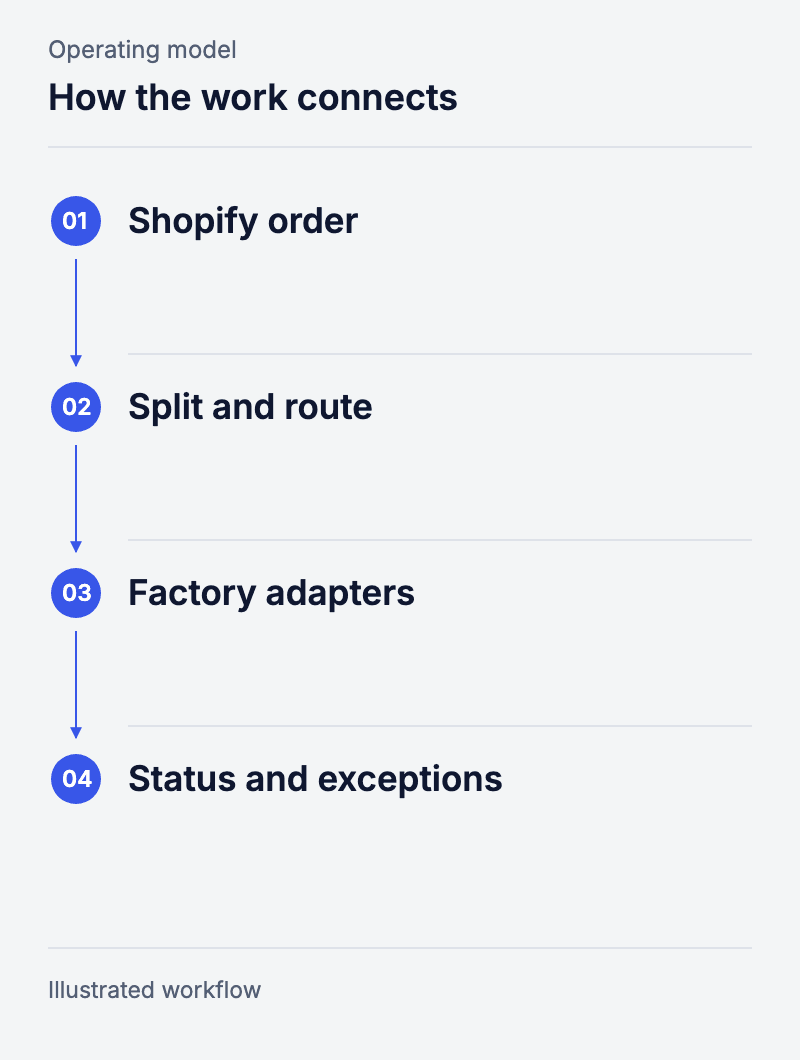
Workflow: Shopify order → Split and route → Factory adapters → Status and exceptions.
How we connected Shopify orders to factories that all work differently
Every factory wants an order described its own way, so each one gets its own translator. That keeps the main order flow clean.
We wrote one adapter for each factory, and each adapter handles whatever steps that factory needs before it will accept an order. All the odd rules and exceptions stay inside the adapter. If the platform and a factory measure things in different units, the adapter converts them on the way out.
Some partners accept one line item at a time, while others take a full order with several items in it. That difference really matters when a single basket includes garments from two or three factories. If we'd treated every partner as if they all accepted orders the same way, the main workflow would have filled up with special cases.
We also pull order status and shipping updates back from the factories. A factory accepting an order isn't the end of the job. The business still has to match what actually happened to each garment against the original Shopify order.
Making the exception path part of the product
In plain terms: when a factory order fails, it does not vanish. Someone is told, and the problem keeps a place to be fixed.
A factory system can reject an order outright, or go down for a while. So we write the error down for follow-up, and retry a set list of short outages a fixed number of times. Warehouse cases that no code can settle raise a Slack message, so the team knows where a person is needed.
An error queue and an alert do two different jobs. The queue holds the problem. The alert brings someone to it. That lets the workflow get on with what it can do, while the stuck cases still have an address.
The build is still maintained. Safeguards and error handling keep growing. The team keeps meeting new mixes of product, factory behaviour and order state. The model is automatic work, visible exceptions and steady upkeep.
A Shopify order routing pattern other multi factory brands can reuse
We delivered one routing layer that works across all four factory connections, along with the operator tools and background jobs that support it. That lets Sene work with four different factories without Shopify ever needing to hold every detail of how a garment gets made.
The same pattern can work for other merchants:
- Keep the commerce records in Shopify.
- Put operating decisions in one shared workflow.
- Give each outside system its own adapter to handle its demands.
The details will always depend on the business. At Sene, this setup has grown over a working relationship that started in 2022, and the client now extends the wider platform with Claude.
People behind the work

Questions and answers
Can one Shopify order go to more than one factory?
Yes. The routing layer groups items by the factory set for each product, then uses the matching adapter for each group.
Does adding a factory require code?
A new factory needs its own adapter and testing. Moving a product between factories that already exist is a settings change.
What happens when an automatic submission fails?
The error is recorded for follow-up. A set list of short outages is retried a fixed number of times. Warehouse cases can alert the team on Slack.
Can operators intervene when an order needs attention?
Yes. Orders a person triggers, pending orders and remakes all run on the shared path. Error records and warehouse alerts give stuck cases a place to be picked up.
Do you build Shopify order routing for multi-factory or multi-supplier fulfilment?
Yes, and this job is a working example. One shared path reads a product-to-factory map, splits a single Shopify order across four garment factories, and converts each order into the units the receiving side expects. A new destination needs its own adapter, but it follows a contract that already exists.