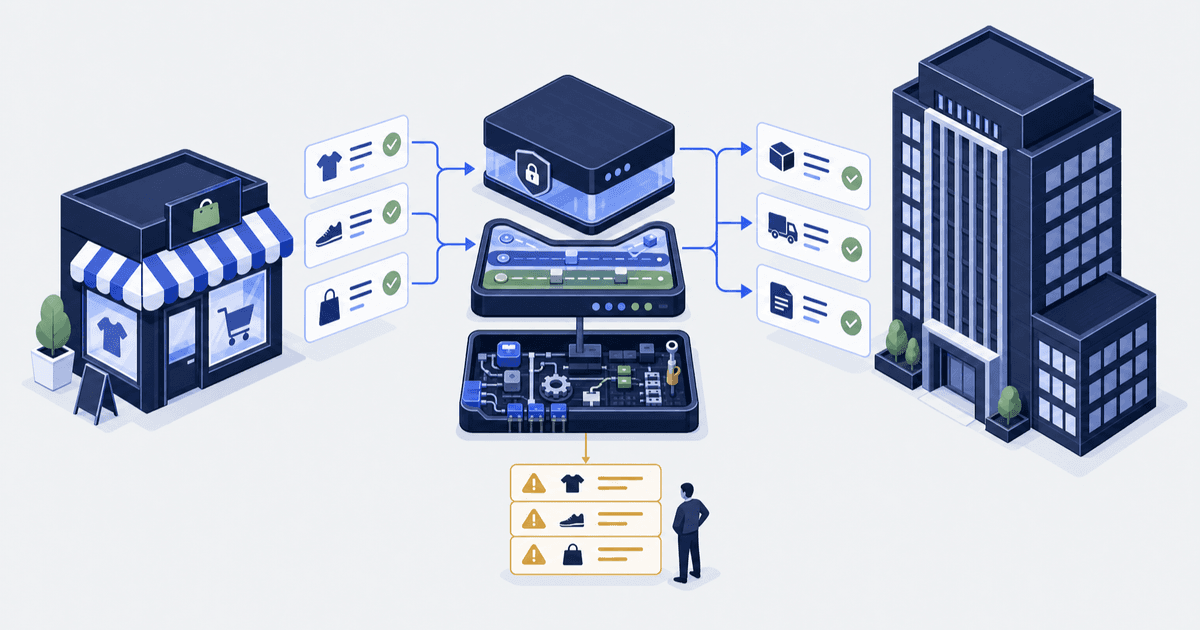
Someone re-keys orders into accounting, someone tags wholesale customers by hand, someone checks a spreadsheet for low stock on Monday, and three apps each do a third of one job. That is what Shopify automation work looks like at $1 million to $30 million a year, and most of it is not a technology problem. Automation here means a rule that runs itself: when an event happens in the store, a condition is checked and an action follows, with no person reading a screen.
The direct answer. Start with Shopify Flow, free on Basic, Grow, Advanced and Plus, for every automation whose trigger, condition and action already exist in Shopify or an installed app. Move to a paid tool when the logic outgrows Flow’s blocks. Move to an integration only when a system outside Shopify owns the record, or the workflow needs retries, duplicate protection (the same event arriving twice produces one record, not two), an exception queue (a list of failed records with a reason and an owner) or an approval step.
Who this is for. Founders and operations leads at Shopify stores in that band who want to know what to automate first, what it costs, and when to stop using Flow.
Who this is not for. Anyone connecting an ERP, 3PL or accounting system. That is an integration, and the Shopify ERP integration guide covers it.
Autonomous Technologies takes the re-keying and the Monday stock checks off an operator’s week by building and repairing integrations and custom apps for Shopify stores. Prices below were checked on 15 September 2026 and link to the vendor page they came from.
Write the rule as one sentence, then name the exception owner. “When X happens, if Y is true, do Z.” If you cannot finish it without saying “it depends”, it is not ready. If Z happens in a system Shopify does not own, you are scoping an integration, not a workflow.
Automation pays back where a stable rule meets a person reading a screen
Automation pays back where a rule is stable, the data is already in Shopify, and a person applies that rule by reading a screen. It does not pay back where the rule changes weekly, where the data lives somewhere Shopify cannot see, or where the work is judgement rather than sorting. An automation with no exception owner moves the manual work rather than removing it.
The twelve automations worth building at $1M to $30M
Each row names the Flow trigger, what Flow can do natively, and the moment the job stops being a workflow and becomes an integration.
| Automation | Flow trigger | Native in Flow | Becomes an integration when |
|---|---|---|---|
| Hold high-risk orders before capture | Order risk analyzed | Hold fulfilment, email a reviewer | An outside fraud vendor decides and its response releases the hold |
| Consolidate same-day repeat orders | Order created | Count that customer's last 24 hours, hold at two or more | The warehouse system decides what ships together |
| Daily list of late orders | Scheduled time | Retrieve, tag, count, total, email | A 3PL holds the ship-by date |
| Route fulfilment failures to a person | Fulfillment service failed to complete fulfillment | Notify and tag | The fix is written back to the warehouse system |
| Unpublish at zero, republish on restock | Product variant out of stock, back in stock | Unpublish, publish, notify | Availability depends on incoming stock held elsewhere |
| Raise a reorder before the shelf empties | Product variant inventory quantity changed | Compare to a threshold, tag, email the vendor | The reorder point is calculated in a planning system |
| Notify a human when a company is created | Company created | Email internally to set terms and catalogue | Credit terms come from a finance system |
| Tag and route B2B orders | Order created | Check company, tag, notify account owner | Contract pricing is resolved outside Shopify |
| Tier customers on real order history | Order created | Total six months of orders, apply tier tag | It spans online and retail purchases |
| Turn a bad review into a ticket | The review app's trigger | Create the ticket, tag the customer | A person must approve a reply and the approval must be recorded |
| Flag chargeback customers | Scheduled time, or Dispute created | Retrieve chargebacks, tag customers | The tag must survive a reversal at the processor |
| Export paid orders to accounting | Order paid | Send HTTP request, on Grow and above | Always, once the posting needs retries, duplicate protection and reconciliation |
The last row is the clearest case. A financial posting needs a stable identifier, retries, protection against posting twice, and a reconciliation pass that finds what never arrived. Flow has none of those.
Five Shopify Flow recipes you can copy
Recipes 1 to 4 are from Shopify’s advanced workflow examples. Names appear as they do in Flow.
- Daily digest of late orders. Trigger
Scheduled timeat 5:00 pm.Get order datafor unfulfilled orders past a two-day window, aFor each loopto tag them,CountandSum, then email the summary. - Consolidate same-day repeat orders. Trigger
Order created.Get order datafor that customer’s last 24 hours,Count, and at two or more, tag and hold the fulfilment order. - Flag customers who file chargebacks. Trigger
Scheduled timeat 10:00 am.Get order datafiltered to chargeback cases, then a loop applying a customer tag. - Loyalty tiers from measured history. Trigger
Order created.Get order dataacross six months,CountandSum, then apply the tier tag. Shopify’s example tags at five or more orders or $100 or more of spend. - Hold high-risk orders before capture. Trigger
Order risk analyzed, with a condition on risk level routing high-risk orders to a reviewer. The template is in Shopify’s Flow template collection and assumes manual payment capture is already on.
On a Scheduled time trigger, Shopify notes that “there is no data automatically included”, so a Get data action has to fetch it before anything downstream can use it. Templates arrive with placeholder tags, thresholds and recipients.
A template is a starting point, not a configuration. Replace every placeholder, run the workflow against a known order, and inspect the resulting record before leaving it switched on.
Which tool for which job
The price spread is roughly a thousand to one, and the $1 million to $30 million band sits where free tooling stops and platform pricing has not begun.
| Option | Published price | Fits when | Runs out when |
|---|---|---|---|
| Shopify Flow | Free on Basic, Grow, Advanced and Plus | Trigger, condition and action all exist in Shopify or an installed app | You need an HTTP call below Grow, a partner app task below Plus, or a queue of failed records |
| Mechanic | $16 Basic, $29 Grow, $99 Advanced, $199 Plus per month, no usage fees | Logic is Shopify-shaped but too specific for Flow | Work spans systems Shopify cannot see |
| MESA | $0 for 50 tasks, $12 for 500, $29 for 10,000, $99 for 50,000 a month | You want multi-step app-to-app flows without code | Task volume makes the meter your largest line item |
| Zapier or Make | Zapier from $19.99 a month at 750 tasks; Make Core $9, Pro $16, Teams $29 at 10,000 credits | The other system has a connector and volume is modest | A failure needs a repair path, not an email |
| iPaaS: Celigo, Patchworks, Pipe17 | None published on their own sites; Celigo near $14,800 a year at the median per Vendr | Several systems, real mapping work, a vendor holding the service agreement | Budget sits below the platform floor |
| Custom app or integration | Build and maintenance cost, not a licence | A system of record outside Shopify, or a need for retries, approvals or an audit trail | An untested supported option would do the same job |
Mechanic’s app listing shows the flat tiers. MESA publishes task tiers on its pricing page. Pipe17 prices “based on order volume, connections, flows, and sub-accounts” plus a one-time configuration charge.
When Shopify Flow runs out
Flow is the right first answer. It has four edges to know before you plan around it, and each has a number attached.
| Limit | Documented value |
|---|---|
| Price | $0 on Basic, Grow, Advanced and Plus |
| Plans with the Send HTTP request action | 3 of 4: Grow, Advanced and Plus |
| Wait for an HTTP response | 30 seconds maximum |
| Retry window on a failed HTTP action | Up to 24 hours, per action |
| Custom app Flow tasks | Plus only |
| Deduplication key on the HTTP action | None |
Plan gating. The Send HTTP request action is, in Shopify’s words, “only available to the Shopify Plus, Advanced, or Grow plans”, and a custom app’s Flow tasks are “available only to a Shopify Plus store that has your app installed”. On Basic, calling an external endpoint from Flow does not work.
Timeouts and partial retries. Flow waits “a maximum of 30 seconds for an HTTP response code”. You can retry that one action for up to 24 hours, fail the run, or ignore the error. It is a retry policy for one action, not for the workflow.
No exception queue. Flow’s Workflow error occurred trigger tells you a run failed. It does not give you a worklist with a failure reason, an owner and a resolved state. Failures become emails, and emails become a folder nobody opens.
No cross-system idempotency. Flow exposes no deduplication key on the HTTP action. Retry a request into a system that does not protect itself and you create the same record twice. For a notification that is harmless. For a financial posting or a fulfilment request, it is the failure that costs money. Wait pauses a workflow; it is not an approval gate that records who decided.
Where a workflow has to cross into other systems with retries and a record of what ran, a self-hosted orchestrator is one route. How to self-host n8n as your own automation server covers that setup. Another route is a custom Shopify app that owns the queue, the retries and the record of what ran.
The boundary is not complexity, it is recoverability. Flow suits logic that can be re-run safely. Work that must happen exactly once, be repaired when it fails and be evidenced afterwards belongs in an integration with its own queue and identifiers.
What an automation should report, from the work
Three numbers, each with a baseline recorded before the workflow goes live:
- Exceptions per week, grouped by reason. A rising count is the earliest signal that a business rule has drifted from what the workflow encodes.
- Time from trigger to completion, including time a held record waited for a person. This shows whether the automation removed a delay or relocated it.
- Manual touches removed, counted as specific tasks a named person no longer performs, confirmed with that person.
At Sene Studio, every order carries custom measurements. The order-routing layer we built turns Shopify purchases into factory orders across four order types and four factory integrations on one shared path, so nobody re-keys an order. It also gives the team a place to fix the ones that fail (Sene Studio). That queue was not an afterthought. It was the design. A percentage without a baseline is not a result. Record two to four weeks before activation and keep the definition identical afterwards.
Shopify automation questions
Do I need a Shopify automation agency?
Often no. If the trigger, condition and action all exist in Shopify or an installed app, and one person can own the exceptions, build it in Flow yourself. Bring in help when the workflow crosses into a system of record outside Shopify, needs controlled retries, or an approval must be evidenced.
What is the difference between Shopify Flow and Zapier or Make?
Flow runs inside Shopify, costs nothing on the paid plans, and sees triggers no external tool can, such as fulfilment order events and B2B company creation. It is plan-gated for HTTP requests and partner app tasks. Zapier and Make meter tasks and reach far more systems. At $10 million volumes, model the meter first.
Can Shopify Flow replace an ERP or OMS integration?
No. On Grow and above Flow can call an external endpoint, which covers notifications and simple pushes. It does not hold a field mapping, a deduplication key, a reconciliation pass or a queue of failed records, and those matter most on the day it fails.
How do we know a Shopify automation is working?
Exceptions per week, time from trigger to completion, and manual touches removed, each against a baseline recorded before the change. Without a baseline, report absolute numbers rather than inventing a percentage.
Turn the list into a scope
Work through the twelve automations above and mark each as built, buildable in Flow, or blocked. The blocked column tells you whether your next step is a plan upgrade, a $29 tool, or an integration with a queue behind it. If inventory accuracy keeps breaking, start with the causes; Shopify inventory sync problems covers the mismatches that make downstream automations unreliable.